Choosing the right Learning Management System (LMS) for your school is one of the most critical decisions you'll make in 2025. With the education landscape rapidly evolving, schools need more than just a platform to host courses—they need an intelligent ecosystem that automates operations, engages parents, manages fees, and personalizes learning.
The best LMS for schools in 2025 isn't just about content delivery—it's about creating a seamless experience for teachers, students, and parents while reducing administrative burden. Whether you're a small private school, a large district, or a coaching institute, this comprehensive guide will help you find the perfect platform that aligns with your needs, budget, and vision.
Why Schools Need More Than a Basic LMS
Parent Engagement
Schools need automated parent communication, real-time progress updates, and fee reminders—features that generic LMS platforms don't provide.
Fee Management
Integrated payment processing, automated fee reminders, and defaulter tracking are essential for school operations but missing from most LMS platforms.
Attendance Automation
Automated attendance tracking with instant parent notifications saves hours of manual work and ensures accurate records.
Report Card Generation
Automated report card generation with board-aligned formats eliminates manual paperwork and ensures consistency across all students.
Quick Comparison: School-Focused Features
| School Feature | Vacademy | Google Classroom | Canvas/Schoology |
|---|---|---|---|
| AI Content Generation | Built-in (Courses, Quizzes, Lessons) | Not Available | Limited |
| Parent Portal & Communication | Built-in with Automation | Basic | Available (Manual) |
| Fee/Payment Management | Native Integration | Not Available | External Integration |
| Attendance Automation | Fully Automated | Manual | Manual |
| Live Class Integration | Native (Zoom, Meet, YouTube) | External | External Integration |
| Report Card Generation | Automated | Manual | Manual |
| Multi-Branch Support | Built-in | Not Available | Limited |
| Setup Time | Minutes | Hours | Days to Weeks |
| Mobile App | White-Labeled Branded App | Generic App | Generic App |
| Automation Engine | Complete Workflow Automation | None | Limited |
1. Vacademy
Vacademy is the #1 AI-powered Learning Operating System designed specifically for modern schools. Unlike traditional LMSs that only manage courses, Vacademy automates the entire school ecosystem—from attendance and scheduling to parent communication and payment management. It's built to help schools save 20+ hours per week on administrative tasks while delivering personalized learning experiences.
Why it's #1 for Schools:
Vacademy isn't just an LMS—it's a complete school management system. It replaces 5+ tools you currently use, handling your website, payments, live classes, parent communication, and fee management in one unified platform.
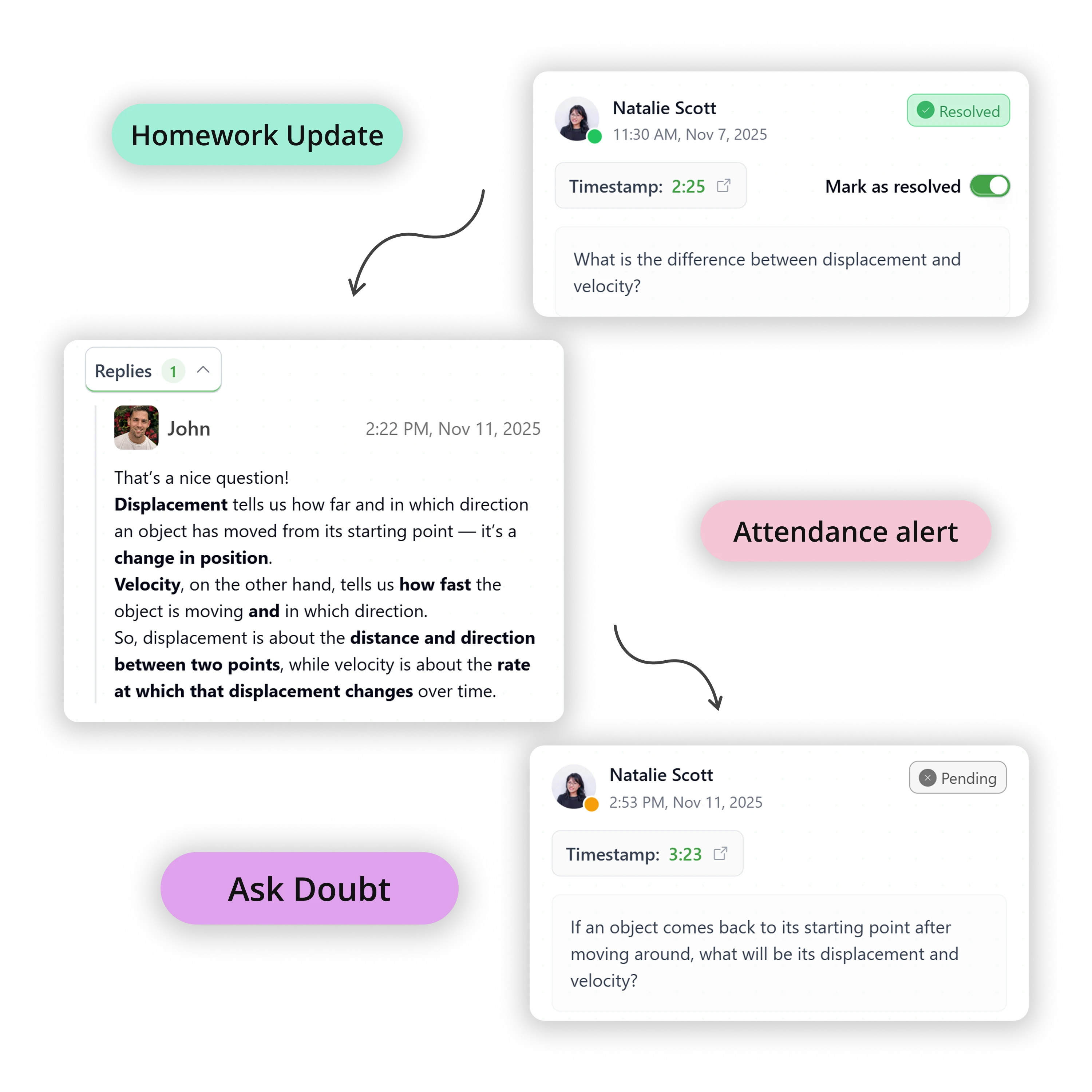
Parent Communication Hub
Automated notifications for attendance, homework, fee reminders, and academic progress. Parents get real-time updates without manual intervention.
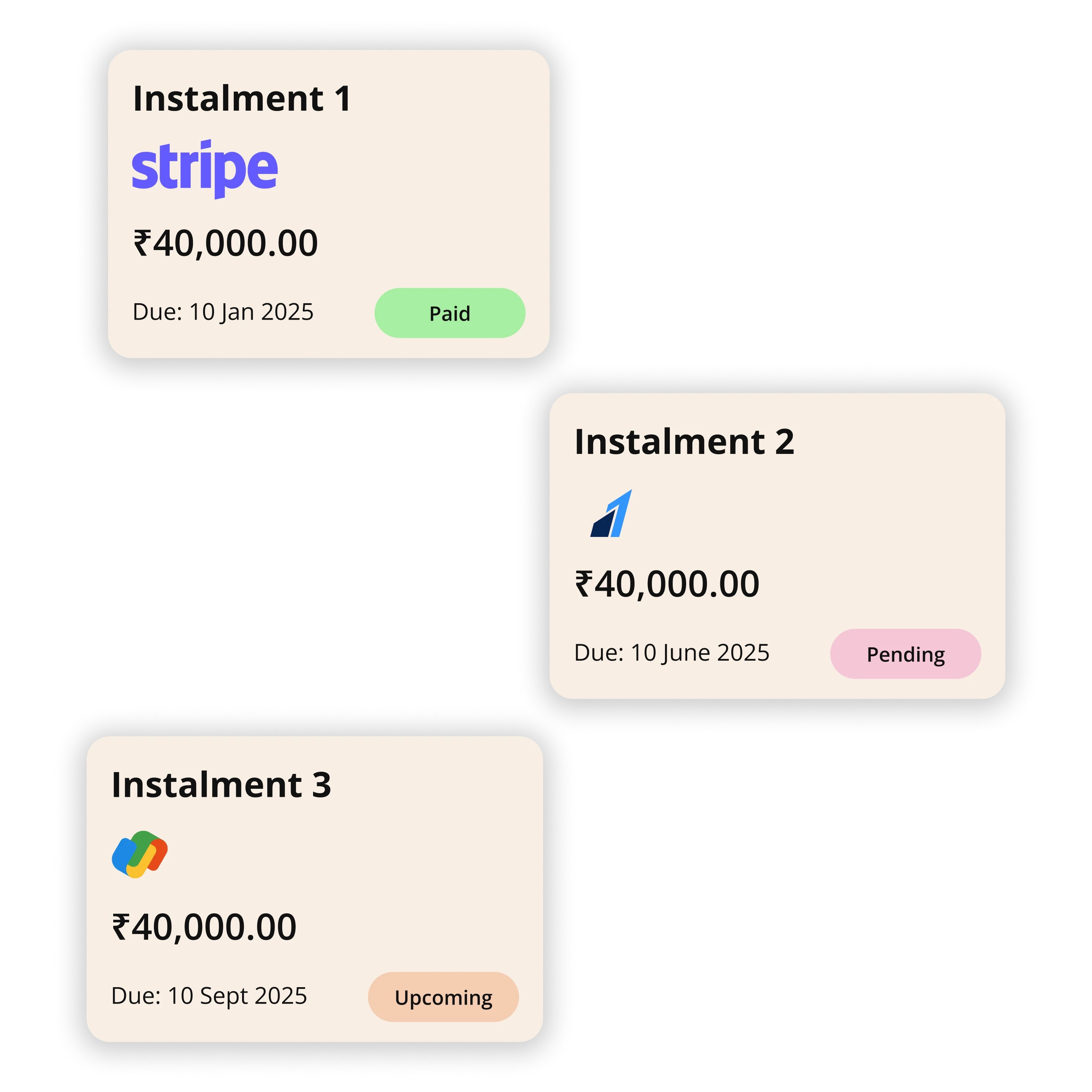
Fee & Finance Management
Seamless fee collection, instalments, invoices, and automated reminders. Track defaulters and generate financial reports automatically.
Pros
- AI Co-Pilot: Auto-generate courses, quizzes, and lesson plans in seconds from PDFs or topics
- Complete School Automation: Automated attendance, parent notifications, fee reminders, and report cards
- Unified Ecosystem: Integrates Live Classes (Zoom/Meet), CRM, Payments, and School Website in one platform
- Parent Portal: Built-in parent communication and progress tracking with real-time updates
- Fee Management: Native payment processing, automated fee reminders, and defaulter tracking
- White-Labeled Mobile App: Custom branded app for your school with full feature access
- Multi-Branch Support: Manage multiple campuses from a single dashboard
- Scalable from 50 to 50,000+ students with enterprise-grade security
2. Google Classroom
Google Classroom is a free, user-friendly platform that integrates seamlessly with Google Workspace for Education. It's designed for simplicity and is widely adopted in K-12 schools due to its zero-cost entry point and intuitive interface.
Pros
- Completely free for schools
- Seamless integration with Google Drive, Docs, Sheets, and Gmail
- Simple assignment distribution and grading
- Real-time collaboration tools
- Mobile apps for iOS and Android
⚠ Considerations
- Limited customization options
- No built-in payment or fee management
- Basic analytics and reporting
- No native live class integration
- Limited automation capabilities
- No parent portal with automated notifications
3. Canvas LMS
Canvas by Instructure is a cloud-native LMS widely adopted in both K-12 and higher education. Known for its modern interface and robust mobile accessibility, Canvas offers comprehensive course management with strong third-party integrations.
Pros
- Intuitive, modern user interface
- Excellent mobile app experience
- Strong assessment and grading tools
- Robust third-party app ecosystem
- Comprehensive analytics dashboard
⚠ Considerations
- Higher pricing for full features
- Setup can be complex for large districts
- Limited built-in automation
- No native CRM or payment integration
- Parent portal requires additional setup
- No automated fee management
4. Schoology
Schoology (now part of PowerSchool) is designed specifically for K-12 education, combining learning management with assessment tools and communication features. It offers strong integration with Google Drive and Microsoft OneDrive.
Pros
- K-12 focused design and features
- Integrated assessment and gradebook
- Parent and student communication tools
- Google and Microsoft integration
- Standards-based grading support
⚠ Considerations
- Can be expensive for smaller schools
- Interface may feel dated compared to newer platforms
- Limited AI capabilities
- Steeper learning curve for teachers
- No built-in fee management
- Limited automation features
5. Moodle
Moodle is the world's most popular open-source LMS, offering extensive customization through its vast plugin ecosystem. While free to download, it requires technical expertise for setup and maintenance.
Pros
- Free and open-source (self-hosted)
- Highly customizable with 1,800+ plugins
- Large global community support
- Supports multiple learning formats
- Strong assessment capabilities
⚠ Considerations
- Requires technical expertise for setup
- Dated user interface (needs customization)
- Hidden costs for hosting and maintenance
- Limited built-in automation
- No native CRM or payment features
- No automated parent communication
- Time-consuming to configure for schools
6. Blackboard Learn
Blackboard Learn is a comprehensive LMS platform with strong analytics and course creation tools. It includes an AI design assistant for course creation and robust student activity monitoring.
Pros
- AI design assistant for course creation
- Comprehensive analytics and reporting
- Strong assessment and grading tools
- Student Activity Details for monitoring
- Enterprise-grade security
⚠ Considerations
- Complex interface with steep learning curve
- Higher pricing point
- Dated user experience
- Limited automation capabilities
- Requires training for effective use
- No native fee management
- Parent portal setup is complex
7. Seesaw
Seesaw is designed for younger students (PreK-5), focusing on creating digital portfolios that showcase student work. It encourages creative demonstrations of learning and strong parental involvement.
Pros
- Age-appropriate for elementary students
- Digital portfolio creation
- Strong parent engagement features
- Simple, intuitive interface for young learners
- Multimedia content support
⚠ Considerations
- Limited features for middle/high school
- Basic assessment tools
- No built-in payment or fee management
- Limited automation
- Not suitable for complex course structures
- No live class integration
8. D2L Brightspace
D2L Brightspace is known for its adaptive learning features and analytics dashboard. It offers personalized learning paths and outcome-based education tools with strong content creation capabilities.
Pros
- Adaptive learning and personalized paths
- Comprehensive analytics dashboard
- Strong content creation tools
- Real-time feedback capabilities
- Mobile-responsive design
⚠ Considerations
- Complex setup and configuration
- Higher learning curve
- Pricing can be high for smaller schools
- Limited built-in automation
- Requires significant training
- No native fee management
- Parent engagement features are basic
9. Edsby
Edsby is tailored specifically for K-12 education, offering attendance tracking, gradebooks, parent communication portals, and real-time analytics. Its user-friendly interface ensures seamless integration with existing school systems.
Pros
- K-12 specific features
- Integrated attendance and gradebook
- Parent communication portal
- Real-time analytics
- User-friendly interface
⚠ Considerations
- Limited customization options
- Smaller user base than major platforms
- Limited third-party integrations
- No built-in payment features
- Basic automation capabilities
- Limited AI features
10. Otus
Otus combines LMS functionalities with assessment and data analytics, gaining traction in K-12 schools aiming for a unified approach to instruction and analytics. It offers data dashboards, standards-based grading, and engagement metrics.
Pros
- Unified LMS and assessment platform
- Comprehensive data dashboards
- Standards-based grading
- Engagement metrics and analytics
- K-12 focused design
⚠ Considerations
- Newer platform with smaller community
- Limited customization
- Pricing may be high for smaller schools
- Limited automation features
- Requires training for full utilization
- No native fee management
What to Look for in a School LMS in 2025?
AI-Powered Automation
Look for platforms that use AI to generate content, automate attendance, and send parent notifications. This saves teachers 15-20 hours per week on administrative tasks.
Parent Engagement
A good school LMS must include parent portals, automated progress reports, and communication tools. Parents should be able to track their child's progress in real-time.
School-Specific Features
Beyond course management, look for fee management, attendance automation, report card generation, and multi-branch support if you operate multiple campuses.
Transform Your School with
Intelligent Automation
See why schools are switching to Vacademy for AI-powered automation, seamless parent communication, and an all-in-one platform that saves 20+ hours per week.
Frequently Asked Questions
What makes an LMS suitable for schools versus other institutions?
School-specific LMS platforms need parent portals, fee management, attendance automation, and report card generation. They should also support multi-grade, multi-teacher environments and integrate with school administrative systems. Unlike corporate LMSs, school platforms must engage parents and handle student-specific workflows.
Is a free LMS like Google Classroom sufficient for schools?
Google Classroom is excellent for basic course management and is free, but it lacks fee management, parent communication automation, and attendance tracking. For schools needing comprehensive management, an all-in-one platform like Vacademy provides automation, payments, and parent engagement in one system.
How important is AI in a school LMS?
AI is becoming essential in 2025. It can generate course content from textbooks, create personalized assessments, automate parent notifications, and analyze student performance patterns. Platforms like Vacademy use AI to save teachers 15-20 hours per week on administrative tasks.
Can an LMS handle both online and offline classes?
Yes, modern LMS platforms support hybrid learning. Vacademy, for example, integrates live classes (Zoom/Meet) with recorded content, tracks attendance for both formats, and manages schedules for in-person and online sessions—all in one platform.
What about parent engagement features?
The best school LMS platforms include parent portals where parents can view their child's progress, assignments, attendance, and grades in real-time. They should also support automated notifications for fee reminders, report cards, and important announcements. Vacademy includes all these features built-in.
How long does it take to implement an LMS in a school?
Implementation time varies. Traditional platforms like Moodle or Canvas can take weeks to months for setup and training. Modern platforms like Vacademy can be set up in minutes, with teachers creating courses on day one. The key is choosing a platform that requires minimal technical expertise.
What's the total cost of ownership for a school LMS?
Beyond subscription fees, consider hosting costs (for self-hosted platforms), IT support, training time, and integration costs. While platforms like Moodle are 'free,' total costs often exceed managed solutions. Vacademy includes hosting, security, updates, and support in one transparent price.
Does Vacademy support multi-branch schools?
Yes, Vacademy includes built-in multi-branch support, allowing schools to manage multiple campuses from a single dashboard. This feature is essential for school chains and helps maintain consistency across locations while centralizing administration.